
Download Portfolio Analyst – Stock Market Investment Tool for Windows, Free & Secure
Portfolio Analyst is a powerful and intuitive stock market investment tool designed for both beginner and experienced investors. This Windows-based software provides a comprehensive platform to track multiple stocks, monitor real-time prices (requires internet), manage transaction histories, generate detailed reports, and perform technical analysis. With seamless integration with Google Finance, users can sync their portfolios effortlessly and enjoy automated report printing for quick reviews. Whether you're managing a small personal portfolio or analyzing complex investment strategies, Portfolio Analyst simplifies the process with clean navigation, customizable dashboards, and robust data visualization. Its focus on real-time insights and user-friendly design makes it a standout choice for anyone serious about optimizing their investment decisions. Download Portfolio Analyst today and take control of your financial future with confidence.
Key Features of Portfolio Analyst
Portfolio Analyst stands out in the crowded financial software market due to its well-rounded feature set tailored specifically for stock market investors. One of its most compelling features is real-time stock price tracking, which updates continuously as long as an internet connection is active. This ensures users never miss a critical market movement, allowing for timely buying or selling decisions. The software supports multiple stock tickers across various exchanges, enabling users to manage diverse portfolios with ease.
Another standout feature is the built-in transaction history manager. Every buy, sell, or dividend payment is logged automatically, making it simple to calculate gains, losses, and tax-related data. This is especially useful during tax season when accurate records are essential. The platform also offers customizable charts and technical analysis tools, including moving averages, RSI, MACD, and Bollinger Bands—standard indicators used by professional traders. These tools help users identify trends and potential entry or exit points based on data-driven insights.
Portfolio Analyst also includes a powerful reporting engine. Users can generate detailed PDF reports with performance summaries, portfolio allocation, and historical trends. These reports can be scheduled or printed instantly, making them ideal for sharing with financial advisors or for personal record-keeping. The integration with Google Finance is a game-changer: it allows automatic syncing of your investment data, reducing manual input errors and saving valuable time. With its intuitive interface and focus on actionable insights, Portfolio Analyst delivers a premium experience without the premium price tag.
Installation & Usage Instructions
Getting started with Portfolio Analyst is straightforward and requires minimal technical knowledge. To begin, visit the official website and download the latest version of the software. The installer is lightweight and typically under 50MB, ensuring fast download times even on slower connections. Once downloaded, run the executable file and follow the on-screen prompts. The installation process takes less than two minutes and requires no advanced configuration.
After installation, launch the application. The first-time setup wizard will guide you through connecting your Google Finance account. Simply sign in with your Google credentials, grant the necessary permissions, and the software will sync your existing portfolio data within seconds. If you’re starting fresh, you can manually add stocks by entering ticker symbols and initial purchase details such as price, quantity, and date.
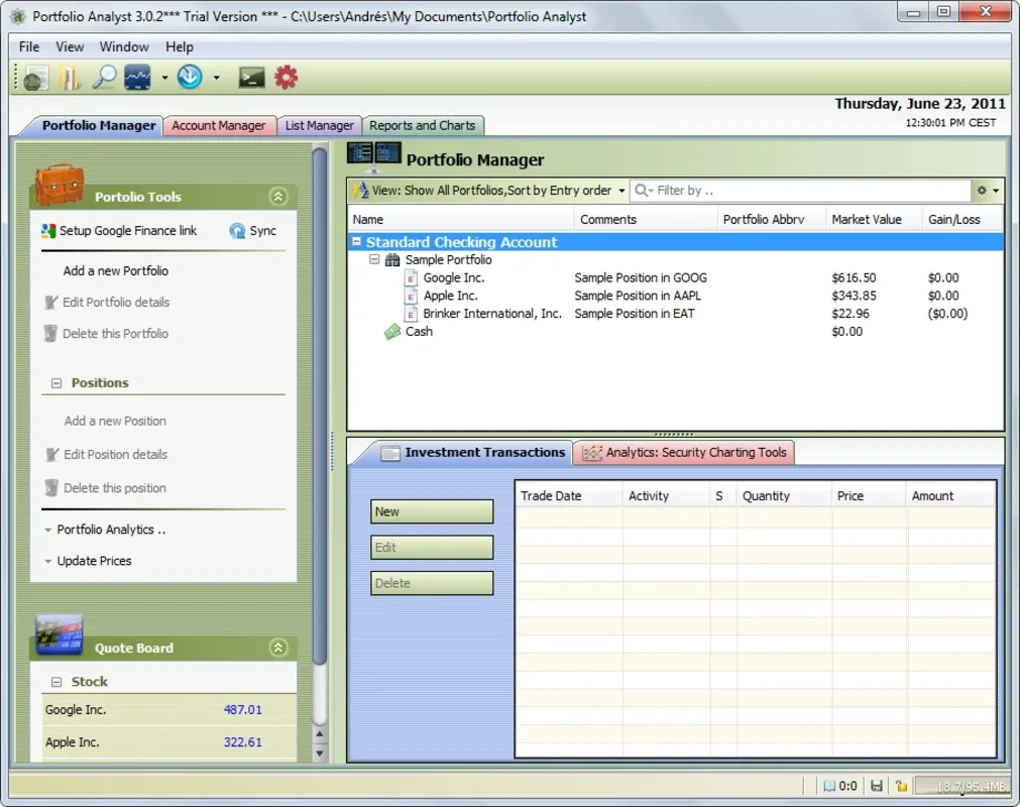
Once your portfolio is loaded, you can explore the dashboard. The main interface displays your total portfolio value, recent performance, and key metrics like ROI and volatility. Click on any stock to view detailed charts, historical data, and technical indicators. You can also set up price alerts—when a stock reaches a specific threshold, Portfolio Analyst sends a notification, helping you stay proactive. For reporting, navigate to the “Reports” tab, select your preferred format (PDF or print), and schedule recurring updates. The software also supports exporting data to CSV for further analysis in Excel or other tools.
Compatibility & System Requirements
Portfolio Analyst is specifically designed for Windows operating systems and is fully compatible with Windows 10, Windows 11, and Windows 8.1. It is optimized for both 64-bit and 32-bit architectures, ensuring broad accessibility across different hardware setups. The software requires a stable internet connection to access real-time market data and sync with Google Finance, so it’s best used on devices with reliable connectivity.
For optimal performance, the recommended system specifications include a modern processor (Intel i3 or equivalent), at least 4GB of RAM, and 100MB of free disk space. The application is lightweight and doesn’t consume excessive resources, so even older machines can run it smoothly. It does not support Mac, iOS, or Android devices at this time, so users on non-Windows platforms will need to explore alternative solutions or use compatibility layers like Parallels or Boot Camp.
Security is a top priority. Portfolio Analyst uses encrypted connections when syncing with Google Finance and does not store your financial data on remote servers. All sensitive information remains on your local machine unless you choose to export it. The software also receives regular updates to patch vulnerabilities and improve functionality. These updates are delivered automatically through the built-in updater, ensuring you always have the latest version without manual intervention.
Pros and Cons
- Pros:
- Real-time stock price tracking with internet connectivity
- Seamless Google Finance integration for automatic syncing
- Comprehensive transaction history and tax-ready reporting
- Advanced technical analysis tools for informed trading
- Lightweight, fast, and user-friendly interface
- Free to download and use with no hidden costs
- Regular security updates and automatic patching
- Cons:
- Only available for Windows (no Mac, iOS, or Android support)
- Requires constant internet access for real-time data
- Advanced features may be overwhelming for absolute beginners
- Limited mobile functionality (no native app)
- Google Finance dependency means access issues if Google’s API changes
Frequently Asked Questions (FAQ)
Is Portfolio Analyst free to download and use?
Yes, Portfolio Analyst is completely free to download and use. There are no subscription fees, trial periods, or hidden charges. The software is supported by optional in-app donations and premium feature upgrades, but the core functionality remains accessible at no cost.
Can I use Portfolio Analyst without an internet connection?
While you can view previously loaded data offline, real-time price updates and Google Finance syncing require an active internet connection. For full functionality, including live market tracking and report generation, an internet connection is necessary.
Does Portfolio Analyst support multiple stock exchanges?
Yes, Portfolio Analyst supports major stock exchanges including NASDAQ, NYSE, and LSE. You can track stocks from various regions by entering the correct ticker symbols, making it suitable for international investors.
How often does the software update?
Portfolio Analyst receives regular updates, typically every 4–6 weeks. These updates include bug fixes, security patches, and minor feature enhancements. The update process is automatic and runs in the background to minimize disruption.
Can I export my portfolio data for use in Excel?
Absolutely. Portfolio Analyst allows you to export transaction histories and portfolio summaries in CSV format, which can be easily imported into Excel or other spreadsheet tools for deeper analysis.
Conclusion: Is Portfolio Analyst Worth It?
If you're an investor looking for a reliable, free, and secure tool to manage your stock portfolio on Windows, Portfolio Analyst is an excellent choice. Its real-time tracking, Google Finance integration, and powerful analytical tools make it a standout in the personal finance software space. While it’s limited to Windows and requires internet access, the benefits far outweigh the drawbacks for most users. Whether you're a novice learning the ropes or a seasoned trader refining your strategy, this software offers the tools you need to stay informed and in control.
With its clean interface, regular updates, and strong focus on data accuracy, Portfolio Analyst delivers real value without a price tag. If you’re serious about investing and want a no-nonsense, feature-rich tool that just works, download Portfolio Analyst today and start building a smarter investment strategy.
Download Portfolio Analyst now and take the next step toward financial independence.







